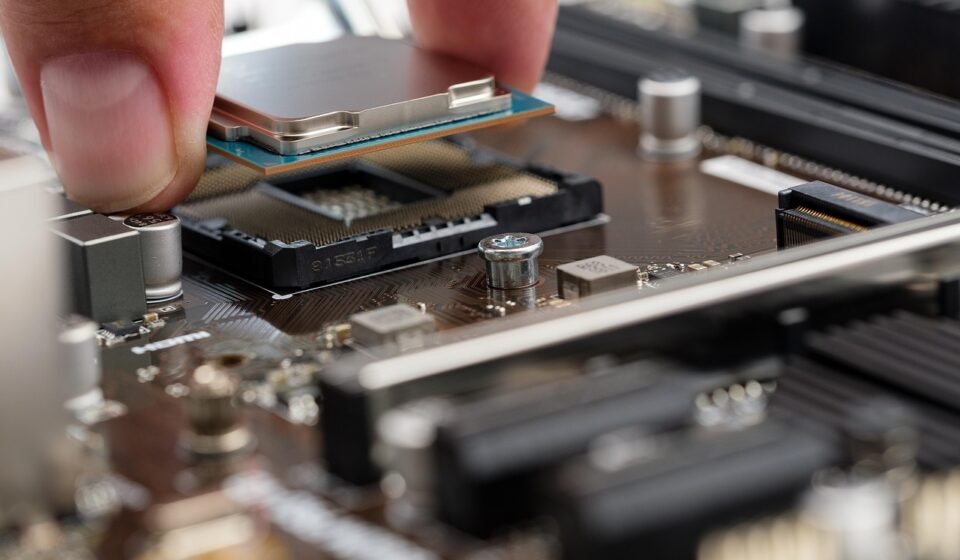
Choosing the best gaming CPU as of June 2026 prevents graphics card bottlenecks and dictates frame rate performance, with models like the AMD Ryzen 7 7800X3D and Intel Core i5-14600K leading their respective categories. A powerful central processing unit coordinates game logic, AI, physics, and streaming data, making it essential for achieving smooth gameplay at high refresh rates.
This guide evaluates top processors from AMD and Intel while explaining key technical factors like clock speed, core count, cache size, and socket compatibility. It also highlights the best options by budget, common buying mistakes, and expert tips for maximizing performance.
The Best Gaming CPUs in 2026: Your Ultimate Performance Guide
As of June 2026, the quest for the ultimate gaming PC often hinges on one crucial component: the central processing unit (CPU). A powerful gaming CPU doesn’t just run your games; it dictates how smoothly they perform, how high your frame rates can climb, and even how well your system handles multitasking like streaming or running background applications. This guide dives deep into the best gaming CPUs available right now, helping you cut through the marketing jargon and technical specs to find the perfect processor for your needs and budget.
Most gamers focus intently on the graphics card (GPU), and while it’s undeniably vital, a CPU bottleneck can cripple even the most beastly GPU. Think of it this way: your CPU is the brain that tells the GPU what to render. If the brain is slow, the artist (GPU) will be waiting around, unable to unleash its full potential. We’ll explore the current world of top-tier processors from Intel and AMD, discuss what truly matters for gaming performance, and highlight specific models that stand out in 2026.
Why Your Gaming CPU Matters More Than You Think
It’s easy to get tunnel vision on GPUs when building a gaming rig. After all, they handle all the graphical heavy lifting. However, the CPU is the unsung hero, managing everything from game logic, AI, physics calculations, and directing the GPU’s work. In many modern, CPU-intensive games, especially those aiming for high refresh rates (144Hz and above), a powerful CPU becomes just as critical, if not more so, than the GPU for achieving smooth gameplay.
For instance, in simulation games, real-time strategy titles, or open-world environments with complex NPC interactions, the CPU is working overtime. A weak CPU here can lead to stuttering, inconsistent frame rates, and a generally less immersive experience, regardless of how powerful your graphics card is. As of 2026, developers are pushing the boundaries of game complexity, making CPU choice a more significant differentiator for gamers than ever before.
And, if you’re a streamer or content creator, your CPU handles encoding and managing your stream’s data. A dedicated streaming CPU or a powerful multi-core processor can encode your gameplay in real-time without significantly impacting your in-game performance. This dual-purpose capability is a key consideration for many PC builders today.
Key Factors in Choosing a Gaming CPU
When evaluating processors for gaming, several technical specifications come into play. Understanding these will help you decipher benchmarks and product descriptions.
Clock Speed
Often cited as the primary indicator of performance, clock speed (measured in Gigahertz, GHz) represents how many cycles a CPU core can execute per second. Higher clock speeds generally mean faster performance, especially in games that rely heavily on single-core performance. For 2026 gaming, top-tier CPUs are pushing past 5.5 GHz, with some boosting even higher.
Core Count
This refers to the number of independent processing units within a single CPU. While older games might have only used one or two cores, modern titles and background tasks benefit significantly from more. For gaming, 6 to 8 cores are generally considered the sweet spot, offering excellent performance for most titles while also providing headroom for multitasking. Enthusiasts aiming for the absolute best, especially for professional streaming, might consider CPUs with 12 or more cores.
Cache Size
CPU cache is a small, extremely fast memory located directly on the processor. It stores frequently accessed data, reducing the need to retrieve it from slower system RAM. Larger caches, especially L3 cache, can significantly boost gaming performance by keeping game data readily available to the cores. AMD’s X3D processors, known for their massive 3D V-Cache, exemplify this benefit.
Architecture and IPC
Beyond raw clock speed, the CPU’s underlying architecture and Instructions Per Clock (IPC) are crucial. A newer architecture with higher IPC can perform more work in each clock cycle, making it more efficient and faster even at the same clock speed. Intel’s latest Core architectures and AMD’s Zen architectures are constantly evolving, offering substantial generational improvements.
Platform and Motherboard Compatibility
CPUs don’t work in isolation. They require a compatible motherboard and often specific RAM types (DDR5 is standard for new builds in 2026). Ensure your chosen CPU socket matches the motherboard socket (e.g., Intel LGA 1700, AMD AM5). Motherboard chipsets also determine features like PCIe generation support and the number of USB ports.
Top AMD Gaming CPUs in 2026
AMD has consistently delivered strong contenders in the gaming CPU market, often differentiating itself with innovative technologies and competitive pricing. As of June 2026, several AMD processors stand out.
AMD Ryzen 9 7950X3D
For those seeking the absolute pinnacle of gaming performance, the Ryzen 9 7950X3D is a formidable option. It combines a high core count (16 cores, 32 threads) with AMD’s 3D V-Cache technology on one of its core complexes. Best Gaming CPUs in 2026: Your Ultimate Performance Guide provides an immense L3 cache, dramatically boosting performance in cache-sensitive games. While it excels at gaming, its productivity performance is also top-notch, making it a true all-rounder.
Its drawback is its premium price tag and the need for careful cooling due to its high performance envelope. Motherboard compatibility requires an AM5 socket, and DDR5 RAM is mandatory.
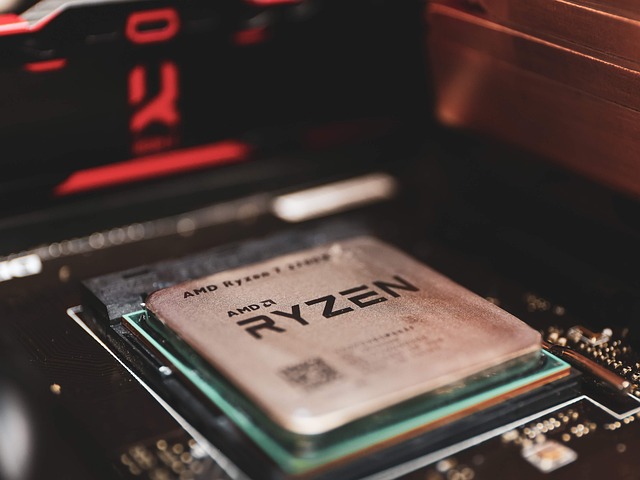
AMD Ryzen 7 7800X3D
Often hailed as one of the best pure gaming CPUs, the Ryzen 7 7800X3D offers a fantastic balance of performance and efficiency. With 8 cores and 16 threads, it uses AMD’s 3D V-Cache technology to achieve class-leading gaming frame rates in many titles. Its power consumption is also remarkably low for its performance class, making it easier to cool than its higher-end counterparts.
While exceptional for gaming, its productivity performance isn’t as strong as CPUs with higher core counts. However, for a dedicated gaming rig, it’s hard to beat its performance-per-dollar in terms of raw gaming FPS.
AMD Ryzen 5 7600X
For gamers on a more moderate budget, the Ryzen 5 7600X provides excellent value. It features 6 cores and 12 threads, delivering solid performance in modern games. It uses the AM5 platform, ensuring future upgrade potential, and supports DDR5 memory. It’s a great entry point into AMD’s current generation gaming CPUs.
It lacks the 3D V-Cache, so it won’t match the X3D variants in cache-sensitive titles, but it offers a significant uplift over previous generation mid-range CPUs and is a capable all-around performer.
Top Intel Gaming CPUs in 2026
Intel remains a formidable competitor, known for its high clock speeds and strong single-core performance, which are often beneficial for gaming. Their latest generations continue this trend with hybrid architectures.
Intel Core i9-14900K
The Core i9-14900K represents Intel’s flagship offering for 2026. It features a hybrid architecture with Performance-cores (P-cores) and Efficient-cores (E-cores), offering a massive total of 24 cores (8 P-cores + 16 E-cores) and 32 threads. This high core count, combined with extremely high clock speeds, makes it a powerhouse for both gaming and demanding productivity tasks. It’s a top choice for users who want the best of both worlds.
However, this performance comes at a cost: high power consumption and heat output, requiring strong cooling solutions and a capable motherboard. It uses the LGA 1700 socket, supporting DDR4 or DDR5 memory.
Intel Core i7-14700K
Striking a great balance between the i9’s top-tier performance and the i5’s value, the Core i7-14700K is a compelling option. It offers 20 cores (8 P-cores + 12 E-cores) and 28 threads. Its excellent clock speeds and improved core configuration over its predecessor make it highly competitive in gaming, often trading blows with higher-end AMD chips.
Like the i9, it can be power-hungry and requires good cooling. Its hybrid architecture also means that game developers need to optimize for it, though most modern titles do this well.
Intel Core i5-14600K
The Core i5-14600K is often considered the sweet spot for many gamers. With 14 cores (6 P-cores + 8 E-cores) and 20 threads, it provides more than enough power for most modern games and general PC use. Its high clock speeds ensure excellent responsiveness, and it’s significantly more affordable than its i7 and i9 siblings.
While it’s a fantastic gaming CPU, it will fall behind the higher-end models in heavily multi-threaded productivity tasks and extremely CPU-bound gaming scenarios. It also uses the LGA 1700 socket.
Best Gaming CPUs by Budget
Selecting a gaming CPU isn’t just about raw power; it’s also about getting the most performance for your hard-earned money. Here’s a breakdown by typical budget tiers as of June 2026.
Enthusiast/No Compromise ($500+)
At this level, you’re looking for the absolute best. The AMD Ryzen 9 7950X3D and Intel Core i9-14900K are the prime contenders. The 7950X3D often takes the lead in pure gaming due to its 3D V-Cache, while the 14900K offers incredible versatility for gaming and heavy content creation. Choosing between them often comes down to specific game benchmarks and your secondary use cases.
Drawback: These CPUs require substantial investment in cooling, motherboards, and potentially RAM, driving up the total system cost significantly.
High-End Performance ($300 – $500)
This is the sweet spot for many serious gamers. The AMD Ryzen 7 7800X3D is a standout here, offering performance that often rivals or exceeds more expensive CPUs in gaming. For Intel users, the Core i7-14700K provides a very capable alternative, excelling in mixed workloads.
Drawback: While excellent, they may not offer the absolute highest frame rates in the most demanding, CPU-limited scenarios compared to enthusiast-level chips.
Mid-Range Value ($200 – $300)
This segment offers excellent performance for the price. The Intel Core i5-14600K is a king here, providing fantastic gaming capabilities that punch well above its weight class. AMD’s Ryzen 5 7600X is also a strong contender, offering great gaming performance and access to the AM5 platform for future upgrades.
Drawback: These CPUs might struggle with ultra-high refresh rate gaming in the latest AAA titles or very demanding multitasking scenarios.
Budget-Friendly/Entry-Level ($100 – $200)
For those on a tighter budget, options like the AMD Ryzen 5 5600X (from the previous generation AM4 platform) or the Intel Core i5-13400F (a slightly older but still capable LGA 1700 chip) offer solid gaming performance. They won’t set any speed records, but they can handle most popular esports titles and many modern games at respectable settings.
Drawback: Performance limitations will be noticeable in graphically intensive or CPU-bound games, and they may not support the latest platform features like PCIe 5.0.
remember that prices fluctuate, and availability can vary. Always check current pricing before making a purchase. For older but still capable platforms, you might find deals on CPUs like the Ryzen 5 5600X or Intel Core i5-12600K, which can offer significant value if paired with a more affordable motherboard and RAM combination.
The Future of Gaming CPUs
The CPU landscape is always evolving. As of June 2026, we’re seeing continued advancements in core counts, clock speeds, and architectural efficiencies. AMD’s ongoing success with 3D V-Cache suggests that larger, faster caches will remain a critical component for gaming performance. Intel’s hybrid architecture is proving successful, and we can expect further refinements in how P-cores and E-cores work together.
Looking ahead, expect CPUs to become even more powerful, with increased focus on AI acceleration and integrated features. The push towards DDR5 memory and PCIe 5.0 (and beyond) will continue, enabling faster data transfer for both system RAM and high-speed storage devices like NVMe SSDs. According to a recent industry outlook from TechInsights, the trend toward increased integration of specialized processing units for AI and machine learning within CPUs will accelerate, impacting not just productivity but also in-game experiences with more sophisticated AI opponents and dynamic environments.

The competition between Intel and AMD is fierce, which is great news for consumers. This rivalry drives innovation, leading to better performance and more value-packed options. Keep an eye on upcoming generations like AMD’s Zen 5/6 and Intel’s Arrow Lake/Lunar Lake architectures, which promise further leaps in efficiency and performance.
Common Mistakes When Buying a Gaming CPU
Even with all this information, it’s easy to make missteps when choosing a gaming CPU. Here are some common pitfalls to avoid:
Overspending on Cores for Pure Gaming
Many gamers feel they need the absolute highest core count available. For most gaming scenarios, 6-8 high-performance cores are more than sufficient. Investing in extra cores you won’t use in games means you might have compromised on clock speed or cache, which are often more impactful for FPS. If your primary use is gaming, prioritize gaming-focused CPUs.
Neglecting Cooling and Power Delivery
High-end CPUs, especially Intel’s K-series or AMD’s top-tier X3D chips, can draw a lot of power and produce significant heat. Skimping on a cooler or a power supply unit (PSU) can lead to thermal throttling (where the CPU slows down to prevent overheating), negating its performance benefits. It can also lead to system instability. Always ensure your cooling solution is adequate for the CPU’s Thermal Design Power (TDP).
Ignoring Platform Costs
The CPU is just one part of the equation. You also need a compatible motherboard, RAM (often DDR5 for newer platforms), and potentially a new cooler. Sometimes, a slightly older but still powerful CPU on a cheaper platform (like AM4) can offer better overall value than a new CPU requiring expensive supporting components.
Not Checking Specific Game Benchmarks
General benchmarks are useful, but individual games can favor different CPU characteristics. Some games thrive on high clock speeds, while others benefit immensely from large caches. Before making a final decision, search for benchmarks of the specific games you play most often with the CPUs you’re considering. Websites like TechSpot, Gamers Nexus, and Hardware Unboxed provide in-depth performance reviews.
Expert Tips for Maximizing CPU Performance
Once you’ve chosen your CPU, a few tweaks can help you get the most out of it.
Keep Your Drivers and BIOS Updated
Motherboard manufacturers and CPU vendors frequently release updates that can improve stability, performance, and compatibility. Ensure your motherboard’s BIOS is up to date, and always install the latest chipset drivers from AMD or Intel. These updates can sometimes unlock hidden performance potential or fix minor issues.
Enable XMP/DOCP for RAM
Your RAM likely has a faster profile (like XMP for Intel or DOCP for AMD) that isn’t enabled by default. Accessing your BIOS settings and enabling this profile allows your RAM to run at its advertised speed, which can provide a noticeable boost in CPU-bound scenarios, particularly for AMD Ryzen processors. According to research by Puget Systems, RAM speed can have a significant impact on CPU-intensive workloads.
Monitor Temperatures and Usage
Use monitoring software like HWMonitor or MSI Afterburner to keep an eye on your CPU’s temperature and core utilization. If you notice temperatures consistently exceeding 80-85°C under load, your cooling might be insufficient, leading to performance throttling.
Consider Game-Specific Settings
Some games have specific graphics settings that are more CPU-intensive than others. For example, draw distance, crowd density, and physics simulations often put a heavier load on the CPU. Tweaking these settings can sometimes free up CPU resources for other tasks or improve overall frame rate consistency without drastically impacting visual fidelity.
Sources: Gaming computer
Frequently Asked Questions About Gaming CPUs
What is the most important factor for a gaming CPU?
For most games, a combination of high clock speed and strong single-core performance is crucial. However, as games become more complex, core count and cache size are increasingly important for smooth, consistent frame rates.
Do I need the latest CPU for gaming?
Not necessarily. CPUs from the last two to three generations can still offer excellent gaming performance. Often, a slightly older, high-end CPU can perform as well or even better in gaming than a newer, mid-range chip, especially if it has features like AMD’s 3D V-Cache.
How much should I spend on a gaming CPU in 2026?
As of June 2026, a good target for a high-performance gaming PC is between $250 and $400 for the CPU. This range typically offers processors like the AMD Ryzen 7 7800X3D or Intel Core i7-14700K, which provide excellent gaming experiences without breaking the bank.
Will a better CPU improve my FPS if I already have a good GPU?
Yes, if your current CPU is a bottleneck. However, if your GPU is already maxed out, a CPU upgrade might yield minimal gains.
Is AMD or Intel better for gaming CPUs in 2026?
Both AMD and Intel offer excellent gaming CPUs. AMD’s X3D processors often lead in pure gaming performance due to their large cache, while Intel’s chips excel in high clock speeds and mixed productivity/gaming workloads. The best choice depends on your specific games, budget, and other PC uses.
What does “3D V-Cache” mean for gaming?
3D V-Cache is AMD’s technology that stacks additional L3 cache vertically onto the CPU die. This massive increase in cache size significantly speeds up data access for games, leading to higher frame rates and smoother performance in many titles, particularly those sensitive to memory latency.
Choosing the right CPU is a critical step in building a powerful gaming PC. By understanding the key factors, considering your budget, and looking at specific benchmarks, you can select a processor that will provide an exceptional gaming experience well into 2026 and beyond. Happy gaming!
Source: Britannica